The Full-Stack Growth Engine: From Sales Navigator Extraction to Logic-Based Outreach

1. Introduction: The Broken Chain of B2B Growth
Imagine you have the world’s most accurate map to buried treasure. You know exactly where the gold is. But to dig it up, you have to hand-draw the coordinates onto a napkin, walk ten miles to a different crew, and hope they can read your handwriting before they start digging.
This is the state of B2B lead generation for most companies in 2026.
They have the map: LinkedIn Sales Navigator. It remains the unparalleled database of professional intent and demographic data.
They have the digging crew: Outreach Automation Tools. These tools are designed to execute actions at scale.
The problem is the gap between them. The “Napkin Hand-off.”
Most growth teams operate in silos. They spend hours building hyper-targeted lists in Sales Navigator. Then, they hit a wall. LinkedIn doesn’t want that data leaving its ecosystem. So, the team resorts to clunky manual exports, third-party scrapers that break constantly, or virtual assistants copy-pasting data into CSVs.
By the time this data reaches the automation tool, it has lost its context. The nuance of why that prospect was selected in Sales Navigator is gone. The result? A highly targeted list receiving a generic, “Hey {FirstName}” message [Source: https://www.linkedhelper.com/blog/linkedin-sales-navigator-export-leads-to-excel/].
The future of growth belongs to those who close this gap. It belongs to the “Full-Stack” methodology – a single, integrated workflow that takes raw Sales Navigator data and seamlessly transforms it into highly adaptive, logic-based conversations.
This guide is about building an end-to-end engine where data extraction and execution logic are two sides of the same coin.
2. Phase 1: The Targeting silo (Understanding the Data Asset)
Before we build the engine, we must understand the fuel. In 2026, Sales Navigator has only grown more powerful, but few use it to its full potential because they know they can’t easily act on the data they find.
Most users treat Sales Navigator like a phone book: filter by title, filter by location, get a list of names.
The Full-Stack marketer treats Sales Navigator like a behavioral intelligence platform. They aren’t just looking for who someone is; they are looking for triggers that indicate a readiness to engage.
The Power of Micro-Segmentation
Instead of one massive list of 5,000 “CEOs in Tech,” the Full-Stack approach requires building ten smaller lists of 500, segmented by nuance.
Segment A: CEOs in Tech who posted in the last 30 days (Trigger: Active Engager).
Segment B: CEOs in Tech who changed jobs in the last 90 days (Trigger: New Mandate).
Segment C: CEOs in Tech who follow your company page but aren’t connections (Trigger: Warm Intent).
Segment D: CEOs in Tech mentioned in the news recently (Trigger: Public Event).
In a disjointed stack, these nuances are lost the moment you export the data. In a Full-Stack Engine, these segments become the foundation of your conditional logic later on.
The “Spotlight” Trap
Sales Navigator’s “Spotlights” feature (showing who is active, shared experiences, etc.) is incredible for identifying low-hanging fruit. But if you can’t pass that “Spotlight” status to your automation tool, it’s useless. You know they changed jobs recently, but your automation tool doesn’t, so it sends a generic “Hope business is going well” message instead of “Congrats on the new role.”
The first step in building a full-stack engine is committing to granular, behavior-based targeting in Sales Navigator, with the intention of using that granularity in the outreach phase.
3. Phase 2: The Bridge (Solving the Extraction Bottleneck)
This is where 90% of growth stacks fail. You have your perfect micro-segments in Sales Navigator. Now, how do you get them out?
As detailed in the Linked Helper blog on Sales Navigator exports, LinkedIn does not make this easy. There is no native “Export to CSV” button for your lead lists. They want you to stay inside their walled garden, using their expensive and limited InMail system.
The “Broken Bridge” Approaches:
The Manual Slog: Hiring VAs to copy-paste profile URLs into a spreadsheet. It’s slow, expensive, and prone to human error.
The Chrome Extension Scraper: Using flimsy browser extensions that scrape the page. These are highly detectable by LinkedIn, often break when LinkedIn updates its UI, and rarely capture the deep data you need for personalization.
The “Zapier Spaghetti”: Trying to string together five different tools to grab a webhook, format data, and push it to a CRM. It’s fragile and complex to maintain.
The Full-Stack Solution: Integrated Extraction
To build a true growth engine, the tool that executes the outreach must also be the tool that extracts the data. This is about data integrity.
An integrated desktop-based tool like Linked Helper doesn’t just “scrape.” Because it operates as a browser, it can mimic a human browsing through the results, visiting each profile and “reading” the entire page, extracting thousands of data points that invisible cloud scrapers miss.
What a Full-Stack Extraction Captures (That others miss):
Full Work History: Not just the current job, but past roles, which is crucial for referencing shared past employers.
Education Details: Schools, degrees, and years attended.
Volunteer Experience & Causes: Critical for deeply humanized, non-salesy opening lines.
Skills & Endorsements: Useful for hyper-specific technical outreach.
Recent Post Content: The actual text of their latest post, which can be fed into AI for summarizing.
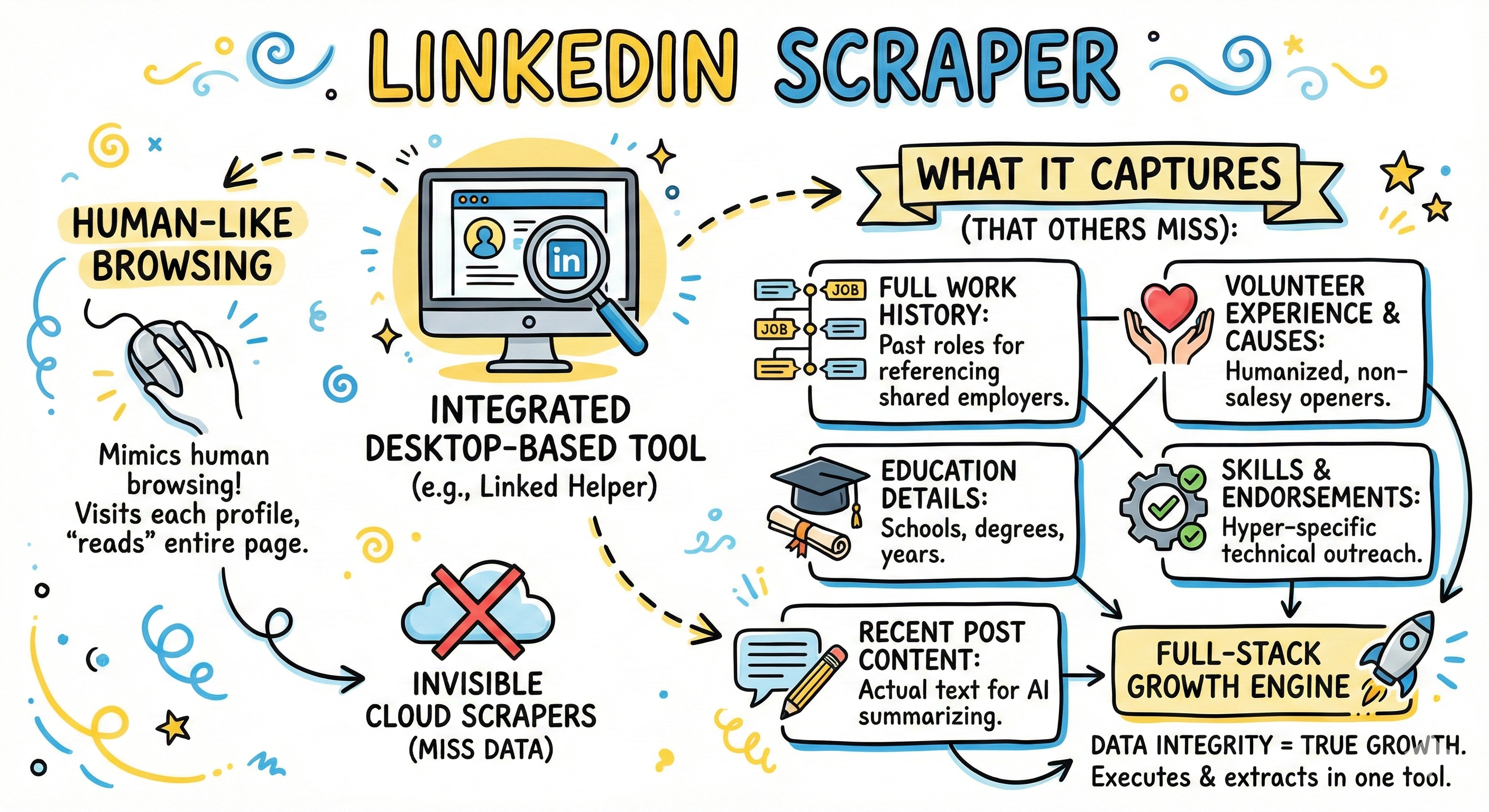
When your execution tool owns the extraction process, you aren’t just getting a name and a LinkedIn URL. You are building a rich, structured database of your prospects that resides within your execution engine, ready to be deployed via logic.
4. Phase 3: The Brain (From Linear to Logic-Based Outreach)
Now you have the fuel (rich, structured data from Sales Navigator) inside the engine. It’s time to turn it on.
Most automation is linear: Send Connection Request -> Wait 3 Days -> Send Message 1 -> Wait 5 Days -> Send Message 2.
This is obsolete in 2026. It doesn’t account for the data you worked so hard to extract. The Full-Stack Growth Engine uses Adaptive Logic. The path a prospect takes changes based on who they are and how they behave.
Mastering IF/THEN/ELSE Syntax
The core of adaptive outreach is conditional logic. As outlined in Linked Helper’s technical documentation on message templates, this allows you to create a single campaign that behaves differently for different people.
Instead of writing five different campaigns for five different personas, you write one “master” campaign with intelligent branching.
The Basic Structure:
IF ({Variable} CONTAINS “Value”) THEN {Specific Message Block} ELSE {Generic Message Block}
Let’s look at how this transforms outreach across three critical dimensions: Safety, Relevance, and Context.
Dimension A: The Safety Logic (Anti-Bot Measures)
Before we even get to persuasion, we need to ensure delivery. Nothing screams “bot” louder than a message with a broken variable, like “Hi {FirstName}!” when the prospect didn’t list a first name.
A Full-Stack Engine uses fallbacks.
The “Missing Data” Fallback:
Logic: IF ({FirstName} IS NOT EMPTY) THEN “Hi {FirstName},” ELSE “Hi there,”
Result: You never send a broken tag. The message always reads naturally.
The “Spin Tax” Randomizer:
LinkedIn watches for identical message patterns. Sending the exact same 300-character block to 1,000 people is a red flag. Logic allows you to randomize sentence variations.Logic: {Hello | Hi | Hey there} {FirstName}, Just {checking in | touching base | following up} on my previous note.
Result: Every message sent is mathematically unique, drastically reducing the algorithmic “fingerprint” of your campaign.
Dimension B: The Relevance Logic (Persona-Based Pivots)
You are targeting C-Level executives at SaaS companies. Your list includes CEOs, CTOs, and CROs. You cannot send them the same value proposition.
A linear approach requires splitting this into three campaigns. A logic-based approach handles it in one message block within the automation tool.
The Template Logic:
“Hi {FirstName}, I’m reaching out because we help SaaS leaders optimize their stacks.
IF ({JobTitle} CONTAINS “CTO” OR “Technical”) THEN “Given your focus on infrastructure scalability, I thought our new API integration benchmark might be relevant.”
ELSE IF ({JobTitle} CONTAINS “CRO” OR “Revenue”) THEN “Given your focus on shortening sales cycles, I thought our case study on reducing deal friction might be relevant.”
ELSE “I thought our recent report on SaaS growth trends might be relevant to your strategic planning.”Result: The CTO gets a technical message, the CRO gets a revenue message, and the CEO gets a strategic message—all fired from the same campaign trigger.
Dimension C: The Context Logic (Behavioral Triggers)
This is the apex of the Full-Stack Engine. It uses the deep data extracted from Sales Navigator (Phase 2) to trigger hyper-contextual messages.
The “New Job” Trigger:
Remember the “Changed Jobs in last 90 days” filter in Sales Navigator? Because your tool extracted that data point, you can use it.Logic: IF ({TimeInRole} < “90 Days”) THEN “Congrats on the new role at {CompanyName}! Usually, the first few months involve reviewing vendor stacks, so I wanted to put this on your radar...” ELSE “I see you’ve been driving growth at {CompanyName} for a while now...”
The “Mutual Connection” Bridge:
Leveraging shared networks is powerful, but only if it’s true.Logic: IF ({MutualConnectionsCount} > 0) THEN “Noticed we both know some of the same folks in the {Industry} space...” ELSE “Although we don’t have direct mutual connections, I’ve been following {CompanyName}’s work...”
5. The Blueprint: A Full-Stack Campaign in Action
Let’s put it all together into a real-world “Tiered Account Playbook” that you could run today using a tool like Linked Helper.
The Goal:
Book meetings with decision-makers at Mid-Market Fintech companies.
Step 1: Sales Nav Targeting (The Micro-Segments)
We create two saved searches in Sales Navigator:
Tier 1 (High Priority): C-Suite in Fintech, 200-500 employees, posted on LinkedIn in last 30 days. (Approx. 800 prospects).
Tier 2 (Medium Priority): VPs/Directors in Fintech, 200-500 employees, less active. (Approx. 2,000 prospects).
Step 2: Integrated Extraction
We point Linked Helper at both search URLs. The tool mimics a human browsing through the results, extracting every available data point, including their recent post activity and full work history, building a local database.
Step 3: The Logic-Based Workflow
We build a single campaign with intelligent branching.
Action 1: “Warm-Up” Sequence (Tier 1 Only)
We use logic to identify the high-priority targets and route them to a pre-outreach engagement flow.
Workflow Logic: IF (SourceList = “Tier 1”) THEN Goto “Like & Comment Action”
The tool visits the Tier 1 prospects, likes their most recent post, and leaves a thoughtful comment (perhaps aided by integrated AI). It waits 2 days.
Action 2: The Connection Request (Adaptive)
Now, the tool sends connection requests to everyone. The note adapts based on the previous action.
Message Logic:
IF (SourceList = “Tier 1”) THEN “Hi {FirstName}, really enjoyed your recent post about {PostTopic}—the point about regulation was spot on. Would love to connect.”
ELSE “Hi {FirstName}, fellow Fintech professional here. I follow {CompanyName}’s work and would love to connect and keep up with your updates.”
Action 3: The Follow-Up Message (The Persona Pivot)
For those who accept, we wait 24 hours and send a value-add message.
Message Logic:
“Thanks for connecting, {FirstName}. We’re currently working with several Fintech CFOs on streamlining compliance reporting.
IF ({JobTitle} CONTAINS “Finance” OR “CFO”) THEN “I have a one-pager on how we reduce audit prep time by 40%. Would you be open to seeing it?”
ELSE IF ({JobTitle} CONTAINS “Operations” OR “COO”) THEN “I have a one-pager on how this integrates with existing operational workflows without disrupting the team. Would you be open to seeing it?”
ELSE “Would you be open to a brief exchange on the compliance challenges you’re anticipating for next year?”
The Result
A single, manageable campaign structure delivers highly personalized experiences. Tier 1 prospects feel nurtured before they are pitched. Finance leaders get finance messaging; Ops leaders get ops messaging. The system runs on autopilot, but the output feels intensely human.
6. Conclusion: The End of Spray and Pray
The era of loading a CSV file and blasting the same message to everyone is over. It is inefficient, it damages your brand reputation, and in 2026, it simply doesn’t generate ROI.
The Full-Stack Growth Engine is not about doing more; it’s about doing better with the data you already have access to. It recognizes that Sales Navigator is useless without a way to extract its richness, and automation is dangerous without the logic to make it relevant.
By integrating extraction and execution into a single, logic-driven workflow, you stop treating your prospects as rows in a spreadsheet and start treating them as individuals at scale. The technology is here. The only question is whether your growth team is ready to stop using the “napkin hand-off” and build a real engine.
7. FAQ: Common Questions About Full-Stack Growth Engines
Q: Is extracting data from Sales Navigator safe?
It depends entirely on the architecture of the tool. Browser extensions that inject code are highly detectable and risky. Standalone desktop applications like Linked Helper, which mimic human browsing behavior to “read” the page, are significantly safer and operate within LinkedIn’s terms of service regarding normal usage.
Q: How many layers of IF/THEN logic can I use?
While tools like Linked Helper allow for nesting logic (an IF inside another IF), it’s best to keep it manageable. Usually, 2-3 levels deep is sufficient for excellent personalization without making the template impossible to read or debug.
Q: Do I need to know how to code to use this logic?
No. Modern full-stack tools provide a visual interface or a simple syntax (like the examples in this article) to build these logic blocks. If you can write a spreadsheet formula, you can build a logic-based message.
Q: Can’t I just use generative AI to write every message from scratch?
You could, but it’s often too slow and expensive for scale. A better approach is a hybrid one: use logic to handle the structural personalization (persona pivots, trigger-based hooks) and use integrated AI to help generate the specific snippets used within those logic blocks, like summarizing a recent post.
Q: Does this replace the need for a CRM?
No. A Full-Stack LinkedIn Engine handles the engagement on LinkedIn. Once a prospect responds and becomes a qualified lead, they should be synced to your CRM (HubSpot, Salesforce) for pipeline management. The best full-stack tools offer integrations or webhooks to facilitate this.
Q: Is Sales Navigator absolutely required for this?
While you can run logic-based campaigns on standard LinkedIn data, Sales Navigator provides significantly richer filtering and data points (like “Years in current position” or “Company headcount growth”) that make the logic much more powerful and targeted. For a true “engine,” Sales Nav is highly recommended.
Take the Risk Out of Automation. If you want to scale your networking while staying under the radar of LinkedIn’s surveillance, Linked Helper is your go-to solution. It is designed to mimic real human activity perfectly, helping you stay within daily limits and maintain a healthy, high-trust account.